Rancher Cluster Registration
How to register a CAPI cluster in Rancher using Turtles auto-import
The only supported workflow to register CAPI clusters in Rancher using Turtles, is by using the cluster-api.cattle.io/rancher-auto-import label:
-
Label a namespace so all clusters contained in it are imported.
kubectl label namespace capi-clusters cluster-api.cattle.io/rancher-auto-import=true -
Label an individual cluster definition so that it’s imported.
kubectl label clusters.cluster.x-k8s.io cluster1 cluster-api.cattle.io/rancher-auto-import=true
When the auto-import label is used, Turtles will wait for the CAPI cluster to have the ControlPlaneAvailable condition set to True.
This condition highlights that the cluster is fully initialized and available to process requests.
Turtles will then automatically create the Rancher clusters.management.cattle.io resource on the management cluster, leading to the installation of the cattle-cluster-agent on the downstream CAPI Cluster.
If the deployment of the agent is successful, the imported cluster should appear on the Rancher Dashboard.
|
A namespace (or cluster) can be marked for auto-import at any time: before or after the cluster has been created. |
|
Marking a cluster for auto-import triggers automatic registration by the Turtles controller, manual execution of registration commands is not supported. |
Add a custom description to Rancher cluster
The default description assigned to an imported Rancher cluster is "CAPI cluster imported to Rancher".
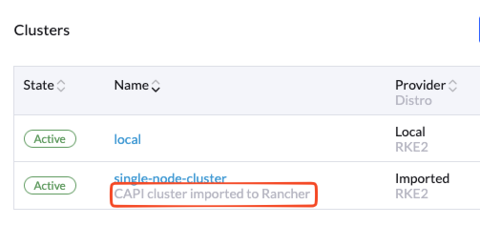
To add a custom description to the imported Rancher cluster, you may add the cluster-api.cattle.io/cluster-description annotation to your CAPI cluster.
apiVersion: cluster.x-k8s.io/v1beta1
kind: Cluster
metadata:
  name: docker-kubeadm-quickstart
  labels:
    cni: calico
  annotations:
    cluster-api.cattle.io/cluster-description: "This is a custom description of Rancher Cluster"
If a CAPI cluster is already imported, adding the annotation will do nothing. You may have to delete your imported Rancher cluster and re-import it.
Delete the imported cluster from Rancher
The cluster-api.cattle.io/capi-cluster-owner and cluster-api.cattle.io/capi-cluster-owner-ns labels can be used to delete the Rancher cluster:
kubectl delete clusters.management.cattle.io -l cluster-api.cattle.io/capi-cluster-owner=cluster1 -l cluster-api.cattle.io/capi-cluster-owner-ns=capi-clustersOnce the imported cluster is marked for deletion:
-
Turtles controller will annotate the CAPI cluster with
imported: true. -
This annotation prevents the cluster from being re-imported automatically by Rancher.
-
Verify the annotation using the following command:
kubectl -n capi-clusters get clusters.cluster.x-k8s.io cluster1 -o json | jq .metadata.annotations
{
"imported": "true"
...
}
|
Deleting the Rancher cluster only removes the |